
A great explainer video starts with a great script. The explainer video script acts as the foundation for your entire production as it determines how clearly your message is communicated, how effectively your visuals are used, and how well your viewers stay engaged from start to finish.
Writing a video script isn’t just about words on paper; it’s about storytelling. It’s about translating your product or service into a short, simple, and emotionally engaging story that helps viewers understand what you offer and why it matters to them.
A well-written explainer video script helps you:
- Communicate complex ideas simply.
- Keep viewers engaged and entertained.
- Ensure the visuals and voiceover stay aligned.
- Create a clear path that leads the viewer to take action.
Without a strong script, even the best animation or cinematography won’t save your video. A good video script outline ensures your video stays focused, consistent, and engaging. It guides every department involved, from the storyboard artist to the animator and voiceover artist, and makes sure everyone is working toward the same goal.
When you invest time in writing a video script properly, you save time and money in production, minimize revisions, and get better results from your video.
8 Simple Steps To Write An Explainer Video Script
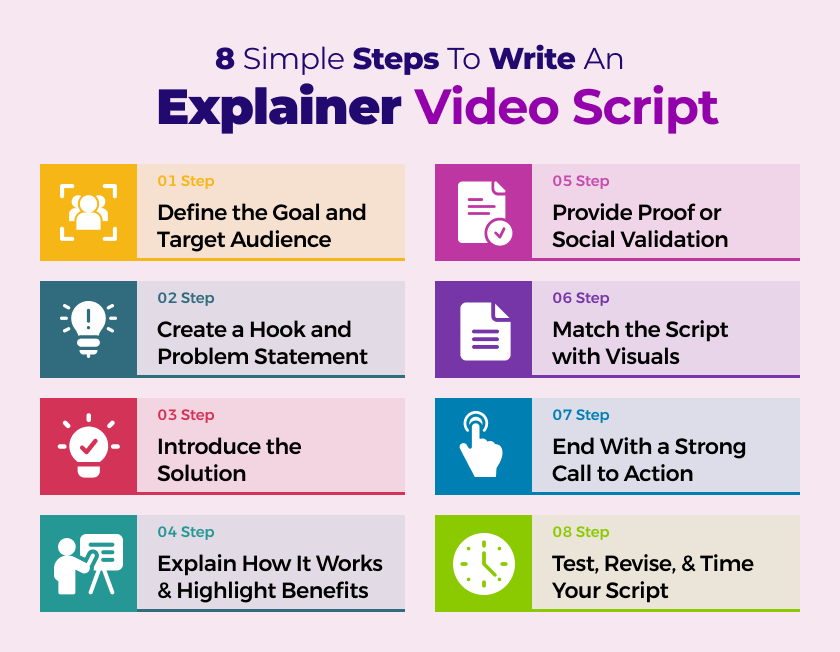
If you’re wondering how to write an explainer video script, here are eight proven steps that professionals follow. These steps combine storytelling, psychology, and structure to help you create a compelling and persuasive script.
Step 1: Define the Goal and Target Audience
Before writing a single word, clarify what your video needs to achieve and who it’s for. Every great explainer video script starts with a clear purpose. Ask yourself:
- What is the central message of this video?
- Who is my target audience?
- What do I want viewers to do after watching?
When your audience and goals are defined, your writing will naturally focus on their needs. This helps you speak their language, highlight their pain points, and present your product or service as the perfect solution.
For example, if your target audience is busy professionals, keep your tone direct and concise. If your viewers are younger, use a casual, energetic tone. The goal defines the tone and rhythm of the entire script.
Step 2: Create a Hook and Problem Statement
The first 10–15 seconds of your explainer video are critical. Viewers decide within seconds whether they will keep watching or scroll away. That’s why your hook and problem statement are essential. Start by identifying a relatable problem. Use a question, statement, or situation that your audience can immediately relate to.
Examples:
- “Tired of spending hours managing spreadsheets?”
- “Ever wish your fitness app actually motivated you?”
- “Struggling to grow your small business online?”
This quick opening tells the viewer, “We understand you.” A well-structured explainer video script always begins with empathy, showing the audience you understand their pain. After presenting the problem, create curiosity. You don’t reveal the solution just yet; you hint that one exists. This keeps viewers hooked and ready to learn more.
Step 3: Introduce the Solution
Once you’ve established the problem, it’s time to present your solution/product, service, or idea. Be clear and concise. Don’t overwhelm your viewers with technical language. Instead, focus on what the solution does and how it helps.
Example:
“Meet FlowTrack — an all-in-one project manager designed to keep your team organized, productive, and stress-free.”
Keep the introduction short, usually 10–15 seconds. Viewers don’t need every feature at this stage; they just need to understand that your solution exists and can solve their problem.
In script writing for video, this step sets up the “hero” moment, as your solution is the hero rescuing the viewer from their frustration.
Step 4: Explain How It Works and Highlight Benefits
After introducing your solution, explain how it works. Keep it visual and straightforward. Break down your process or product into three clear steps or benefits.
Here’s an example structure for a video script outline:
- Step 1: “Download the app.”
- Step 2: “Connect your data in minutes.”
- Step 3: “Track performance automatically.”
Each point should flow naturally and emphasize its benefit. Don’t just list features but translate each one into a benefit that matters to the viewer.
Example:
“With one click, FlowTrack syncs your data — saving you hours every week.”
Viewers care more about why it helps them than how it works technically. This section should make your viewer think, “That’s exactly what I need.”
Step 5: Provide Proof or Social Validation
Once your viewers understand the solution, they’ll want proof. This is where trust and credibility come into play. Use data, testimonials, achievements, or recognizable clients to back up your claims. Proof reassures the audience that your product or service actually works.
Examples:
- “Trusted by over 10,000 small businesses worldwide.”
- “Our users save an average of 30% on project costs.”
- “Used by brands like Shopify, Slack, and Asana.”
In writing a video script, credibility adds weight to your message. Even one sentence of proof can dramatically boost confidence in your offer.
Step 6: Match the Script with Visuals
An explainer video script also guides the visuals. The goal is to make sure what viewers hear and what they see work together seamlessly. When writing your script, include short notes on what visuals should accompany each line. For example:
- Voiceover: “With one click, your dashboard comes alive.”
- Visuals: A bright animation of data transforming into graphs and charts.
This ensures the creative team understands the timing, pacing, and flow. If you’re creating the video yourself, this process doubles as a storyboard.
A clear video script outline with visual direction helps you avoid confusion later in production. It keeps your message consistent and ensures the visuals reinforce your words.
Step 7: End With a Strong Call to Action
A great explainer video script always ends with a clear and direct call to action. Once you’ve explained the problem, solution, and benefits, tell the viewer what to do next.
Examples of effective CTAs include:
- “Sign up today to get started.”
- “Book your free demo now.”
- “Download the app and see the difference.”
Your call to action should be specific, simple, and time-sensitive. Avoid vague endings like “Learn more” without a clear direction. The CTA is your final chance to turn interest into action. End confidently, and make the next step easy for the viewer to take.
Step 8: Revise, Time, and Refine Your Script
Once you finish the first draft, review and refine it. This is where you polish tone, rhythm, and timing.
Read your script aloud. How long does it take? For a standard explainer video, 130–150 words per minute is ideal. If your script sounds rushed or unnatural, slow it down.
Look for unnecessary words, awkward transitions, or repetitive phrasing. Simplify your sentences so they sound conversational when spoken. Ask for feedback from your team or someone unfamiliar with the project. If they understand it easily, you’ve done it right.
A good rule of thumb: if your script sounds good when read aloud, it will sound great in the final video.
Examples of Explainer Video Scripts
Here are five well-structured explainer video script examples you can use for inspiration. Each one follows the steps above: problem, solution, benefits, proof, and call to action.
Example 1: 60-Second Tech Explainer Script
Voiceover:
“Meet Aver. The simple, effective identity verification provider.
What if you could safely identify someone from anywhere in the world with just a selfie? Aver’s technology uses facial recognition and AI to instantly verify identities.
Our easy-to-use dashboard displays results in seconds, helping you catch fraud before it happens. Aver’s seamless integration means you don’t need an entire team of developers to stay compliant.
We are changing how the world shares identity.
Aver – identity that works. Visit goaver.com to learn more.
Why it works: It opens with a relatable problem, introduces the product quickly, highlights benefits, and ends with a confident CTA.
Example 2: B2B Explainer Video Script
Voiceover:
“Are you overpaying for workers’ compensation insurance?
If your business runs safely and efficiently, you deserve a refund on your premiums. Approach Management Services helps companies reduce workplace injuries and lower claim costs.
With a dedicated claims coordinator and a proven safety team, we’ve saved clients over $500 million since 1992. Improve your safety and start saving. Visit approachms.com today.”
Why it works: It speaks to a specific business pain point, offers a clear solution, uses proof, and finishes with a straightforward call to action.
Example 3: 30-Second Science Explainer Script
Voiceover:
“Tired of noise near your lab ruining your results?
Hertz eliminates environmental interference with vibration, acoustic, and EMI isolation systems.
Our active vibration control platforms protect even the most advanced microscopes, ensuring accurate measurements every time.
Contact Hertz to learn how we can help your research reach new levels of precision.”
Why it works: Short, specific, and technical without jargon. Perfect for a niche scientific audience.
Example 4: SaaS Product Explainer Script
Voiceover:
“Struggling to keep track of your projects and deadlines?
TaskBoard simplifies work management with one clean dashboard that helps teams plan, track, and deliver on time.
Drag, drop, and check off tasks as you go. It’s built for busy teams who want clarity fast.
Trusted by over 10,000 teams worldwide, TaskBoard helps users save four hours per week.
Start your free trial today and get organized in minutes.”
Why it works: It’s friendly, relatable, and highlights efficiency with exactly what SaaS users want.
Example 5: Healthcare Explainer Script
Voiceover:
“Managing prescriptions can be confusing and time-consuming.
MedEase keeps your medications organized, on schedule, and synced across all your devices.
Get automatic reminders, refill alerts, and an easy way to share updates with your doctor.
Your health deserves simplicity. Download MedEase today and take control of your care.”
Why it works: It connects emotionally, solves a real problem, and has a clear CTA.
Putting It All Together: The Scriptwriting Workflow
Here’s a simple workflow you can use when writing your own explainer video script:
- Start with research: Understand your product, audience, and purpose.
- Build your outline: Create a short video script outline listing main sections: Hook, Problem, Solution, Benefits, Proof, CTA.
- Write the first draft: Use natural, conversational language and stay under 150 words per minute.
- Add visual notes: Include short descriptions for animations or live-action shots that complement each scene.
- Review and cut fluff: Eliminate unnecessary details. Keep every sentence purposeful.
- Time and refine: Read it aloud to ensure pacing and clarity.
- Get feedback: Ask colleagues or potential viewers for reactions.
- Finalize and hand off: Send your polished script and outline to the animation or production team.
Following this process ensures your message is focused, your visuals are cohesive, and your video achieves its goal.
A Great Script Goes A Long Way!
Writing a great explainer video script is a mix of storytelling, psychology, and structure. The best scripts are short, focused, and emotionally engaging. They guide the viewer from curiosity to understanding and finally to action.
When you follow the eight steps from defining your goal, crafting a hook, presenting your solution, showing how it works, adding proof, aligning visuals, closing with a call to action, and refining, you will have a polished script ready for production.
Use the video script examples above to inspire your structure and tone. Keep your language conversational, your pacing steady, and your message focused on the viewer’s needs.
With the right words in place, your video will not just explain; it will also inspire. It will connect, convince, and convert.
If you’re ready to bring your story to life with a professional explainer video, partner with Pixel Studios your creative team for impactful storytelling and animation that delivers results.
Join The 1000+ Brands That Pixel Studio Has Helped Break The Digital Divide With Animation, Design, & Development.
Get in touch with our animation experts today and bring your vision to life!
FAQs
Q: How long should an explainer video script be?
Aim for 130–150 words per minute. A 60-second video should have around 150 words, while a 2-minute video should be about 300 words.
Q: What makes a good explainer video?
It’s short, clear, engaging, and focused on solving a viewer’s problem. The visuals and narration should complement each other, and the video should end with a strong call to action.
Q: Can I write a script myself?
Yes. Many businesses write their own scripts using a clear outline. Just make sure to focus on your audience’s perspective and keep the language simple.
Q: What’s the difference between a video script and a storyboard?
A script focuses on what’s said and shown, while a storyboard adds visual references for each scene. Both are used together in production.
Q: How long does it take to write an explainer video script?
Typically, one to two weeks, depending on complexity and feedback rounds. A first draft often takes one to three days to complete.
Q: How do I know if my script works?
Read it aloud. If it sounds natural and clear, and you can imagine the visuals flowing with it, you’re on the right track.


 +1-332-228-0460
 +61-480-041-659