
Chromebooks have evolved from simple web-browsing devices into powerful cloud-based machines capable of handling creative tasks, including animation.
Whether you’re a student, hobbyist, educator, or aspiring animator, finding the right 3d animation software for Chromebook can open doors to storytelling, game design, YouTube content creation, and even 3D printing.
In this comprehensive guide, we’ll explore the best free tools, practical tips, and expert recommendations to help you choose the ideal 3D animation software for Chromebooks, with free options available today. We’ll also discuss how professional studios like Pixel Studios INC can help you scale your ideas into production-ready animations.
Why Use a Chromebook for 3D Animation?
Chromebooks have rapidly evolved from simple web-browsing devices into capable creative machines that support design, editing, and even 3D animation workflows. For students, beginners, educators, and hobbyists, they offer an affordable and practical way to enter the animation world without investing in expensive hardware.
Traditionally, 3D animation required powerful desktops with dedicated GPUs, large storage capacity, and complex software installations. However, modern Chromebooks leverage cloud computing, Android app compatibility, and Linux support to make animation more accessible than ever.
One of the biggest advantages of using a Chromebook for animation is its cloud-first architecture. Most modern animation apps for Chromebooks operate directly within a web browser, eliminating the need for heavy downloads or complex installations.
Because projects are saved to the cloud, users can access their files from anywhere, collaborate in real time, and avoid losing work due to hardware failure. Cloud rendering options further reduce the strain on system resources, allowing creators to produce animated content without high-end specifications.
Another major benefit is access to the Google Play Store. Chromebooks support Android applications, which means users can install various 3D animation apps for Chromebooks that are optimized for lightweight performance. These apps often feature intuitive interfaces, drag-and-drop tools, and beginner-friendly controls, making them ideal for those just starting their animation journey. For young creators or classroom environments, this simplicity is a huge advantage.
Linux (Crostini) support adds another powerful layer of flexibility. By enabling Linux mode, users can install open-source tools that provide more advanced animation capabilities. This opens the door to professional-grade experimentation and deeper learning opportunities for anyone serious about mastering 3D animation for Chromebook. While performance depends on the device’s specifications, Linux compatibility significantly expands what a Chromebook can accomplish creatively.
Affordability is another compelling reason to choose a Chromebook. Compared to high-performance laptops designed specifically for 3D rendering, Chromebooks are far more budget-friendly. This makes them ideal for students and beginners learning how to animate on chromebook without committing to costly equipment. Schools also benefit from this accessibility, as Chromebooks are already widely integrated into educational systems.
Portability enhances the experience even further. Chromebooks are lightweight, have long battery life, and are easy to carry between school, home, or creative workspaces. This mobility supports consistent practice and allows creators to work on projects anytime inspiration strikes.
Key Benefits of Using Chromebook Animation Software
- Cloud-based storage and rendering for smoother performance
- Access to Android-based 3d animation apps for Chromebook
- Linux support for advanced open-source tools
- Budget-friendly setup for beginners and students
- Lightweight and portable design for flexible creativity
- Ideal learning environment for 3d animation for Chromebook projects
- Easy installation and minimal system maintenance
If you’re wondering how to animate on chromebook, the key lies in choosing tools that are optimized for browser-based or lightweight operating systems. With the right applications and workflow strategies, Chromebooks can serve as surprisingly effective platforms for learning, experimenting, and even producing polished animated content.
What to Look for in 3D Animation Software for Chromebook?
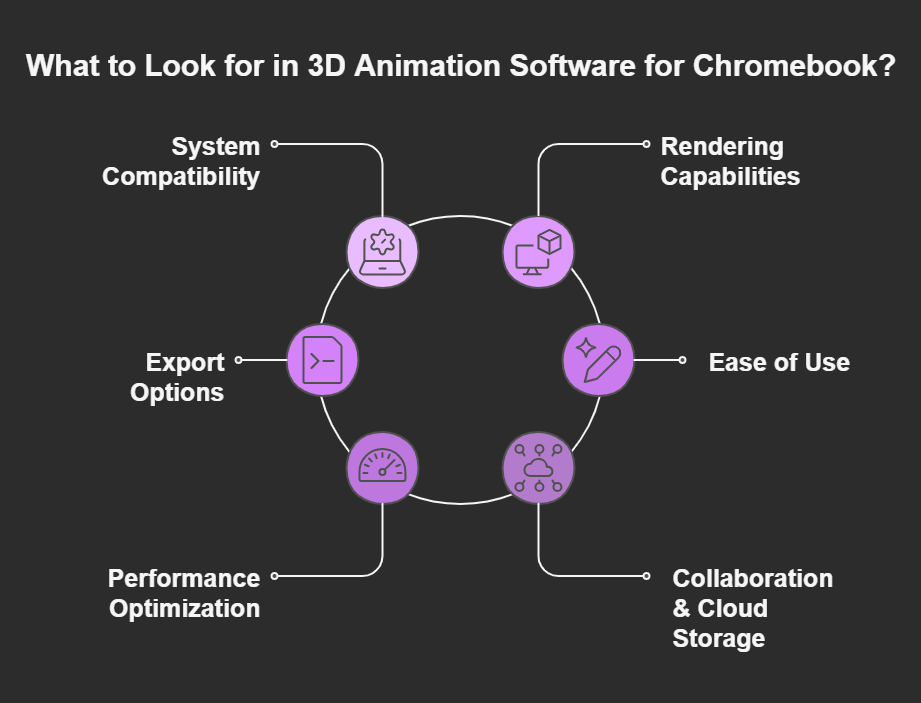
Choosing the right animation software for Chromebook requires careful consideration, especially since Chromebooks operate differently from traditional Windows or macOS systems. While they are powerful for cloud-based and lightweight tasks, they still have hardware limitations compared to high-end animation workstations.
That’s why selecting optimized tools is essential for smooth performance, efficient workflows, and high-quality results. Whether you’re a student, hobbyist, educator, or beginner creator, understanding what features matter most will help you make the right decision.
Below are the key factors to evaluate before installing or subscribing to any animation tool on your Chromebook.
-
System Compatibility
Compatibility should always be your first checkpoint. Not all animation programs are built to run on ChromeOS, so it’s important to verify how the software operates within the Chromebook ecosystem.
Check whether the tool works via:
- Web Browser: Browser-based tools are often the most reliable option. These platforms run entirely online, meaning you don’t need to install heavy files. They are ideal for Chromebooks because they rely on cloud computing rather than local system resources.
- Android App: Many creative tools are available through the Google Play Store. Android-based animation apps are optimized for lightweight devices and touchscreen compatibility, making them practical for Chromebook users.
- Linux Installation: If your Chromebook supports Linux (Crostini), you can install more advanced open-source software. This option is better suited for intermediate users who want more control and professional-grade tools.
Choosing software that aligns with your device’s capabilities ensures better performance and fewer technical issues
-
Rendering Capabilities
Rendering is one of the most resource-intensive parts of 3D animation. Since most Chromebooks don’t have dedicated GPUs, relying solely on local rendering can slow down performance significantly.
That’s why cloud rendering is ideal. Cloud-based animation platforms process complex scenes on remote servers instead of your device. This allows you to:
- Render animations faster
- Avoid overheating or lag
- Work on detailed projects without system crashes
- Maintain smoother playback during editing
If the tool does offer local rendering, make sure it includes adjustable quality settings so you can reduce resolution during previews and increase it for final exports.
-
Export Options
Export flexibility is another critical factor. Depending on your goals, whether it’s social media, YouTube, gaming, or 3D printing, you’ll need specific file formats.
Look for software that supports:
- MP4 – Ideal for video sharing and online publishing
- GIF – Great for short looping animations
- FBX – Useful for game engines and professional pipelines
- OBJ – Common 3D model format
- STL – Important if you’re using a free 3d slicer for Chromebook for 3D printing
Having multiple export options ensures your projects remain versatile and compatible with other tools or platforms. If you plan to integrate animation with modeling or printing workflows, format compatibility becomes even more important.
-
Ease of Use
If you’re new to animation on Chromebook, the learning curve matters. A beginner-friendly interface can make the difference between frustration and creative enjoyment.
Look for:
- Drag-and-drop functionality
- Clear timeline controls
- Simple keyframe editing
- Built-in tutorials or templates
- Pre-made assets and character rigs
An intuitive dashboard helps you focus on creativity rather than technical troubleshooting. For students and first-time users, simplified tools can accelerate learning while still delivering impressive results.
-
Performance Optimization Features
Because Chromebooks have limited hardware power compared to professional animation systems, performance optimization is crucial. Choose software that offers:
- Adjustable preview quality
- Lightweight project modes
- Automatic cloud saves
- Minimal background processing
These features help maintain smooth operation even when working on more detailed scenes.
-
Collaboration & Cloud Storage
Many Chromebook users rely on cloud ecosystems like Google Drive. Animation software that integrates with cloud storage makes it easier to:
- Share projects with classmates or team members
- Collaborate in real time
- Access files from multiple devices
- Prevent data loss
This is especially useful in school environments or remote creative teams.
Selecting the right animation software for Chromebook s about compatibility, performance, and usability. Prioritize browser-based or cloud-supported tools, ensure flexible export options, and choose software with a user-friendly interface. By carefully evaluating these factors, you can create high-quality animations efficiently, even on lightweight Chromebook devices
Best Free 3D Animation Software for Chromebook
Below are the top-rated options based on usability, features, and Chromebook compatibility.
-
Blender (Linux Version on Chromebook)
Blender is one of the most powerful open-source tools available. While it’s not natively designed for ChromeOS, it can be installed using Linux support.
Features:
- Professional-grade 3D modeling
- Rigging and character animation
- Particle systems and simulations
- Rendering with Eevee and Cycles
Blender is arguably the most advanced 3d animation software free for Chromebook if your device supports Linux mode.
Best For:
- Intermediate to advanced animator
- Students learning professional pipelines
- Creators needing detailed rendering
-
Tinkercad (Web-Based 3D Tool)
Tinkercad is a browser-based tool that works seamlessly on Chromebooks. Though primarily used for modeling and 3D printing, it includes animation features.
Features:
- No installation required
- Beginner-friendly interface
- Cloud-based projects
It’s ideal for students learning basic animation for Chromebooks.
-
Clara.io (Cloud-Based 3D Animation Tool)
Clara.io runs entirely in your browser, making it one of the most accessible free animation software solutions.
Features:
- Keyframe animation
- Mesh editing
- Cloud storage
- Collaboration tools
Because it’s browser-based, it’s a strong choice for users seeking animation apps for chromebook free.
-
FlipaClip (Android App for Chromebook)
FlipaClip is primarily 2D, but it’s one of the most popular free animation apps for Chromebooks available through the Play Store.
Features:
- Frame-by-frame animation
- Audio integration
- Layer support
- Beginner-friendly UI
While not 3D-focused, it’s excellent for learning animation fundamentals.
-
Plotagon (3D Character Animation)
Plotagon allows users to create animated stories using pre-built 3D characters.
Features:
- Ready-made 3D characters
- Scene customization
- Voiceover support
- Storyboard-style interface
A simple solution for creators wanting 3D animation software for Chromebooks free without technical modeling knowledge.
-
Vectary (Browser-Based 3D Design Tool)
Vectary combines modeling and animation within a web interface.
Features:
- Real-time rendering
- Drag-and-drop editor
- Collaboration tools
- Cloud-based saves
An efficient Chromebook animation software option for marketing visuals and product animations.
Comparing the Top Free 3D Animation Software for Chromebook
| Software | Platform | Skill Level | Best For |
| Blender | Linux | Advanced | Professional 3D projects |
| Clara.io | Browser | Intermediate | Cloud-based animation |
| Tinkercad | Browser | Beginner | Educational use |
| FlipaClip | Android | Beginner | 2D animation |
| Plotagon | Android | Beginner | Storytelling |
Each tool provides a different experience depending on whether you want professional rendering or simple animation on Chromebook projects.
How to Animate on Chromebook: Step-by-Step
Step 1: Choose Your Tool
- Pick a browser-based or Android-supported tool.
Step 2: Create or Import Assets
- Use built-in libraries or create custom 3D models.
Step 3: Add Keyframes
- Set movement points on the timeline.
Step 4: Adjust Camera & Lighting
- Enhance realism and depth.
Step 5: Export
- Render your animation in MP4 or GIF format.
This workflow applies whether you’re using animation software for Chromebook free or premium upgrades.
Limitations of Chromebook Animation Software
While modern Chromebooks are powerful, they still have limitations:
- Limited GPU performance
- Storage constraints
- Advanced rendering may lag
- Complex physics simulations can struggle
If you’re working on commercial-grade projects, professional studios like Pixel Studios INC offer advanced production support beyond what typical animation software Chromebook tools can handle.
When to Upgrade from Free Tools?
Free tools are perfect for:
- Students
- Hobbyists
- Beginner YouTubers
- Small school projects
However, for:
- Brand campaigns
- Game cinematics
- TV commercials
- Product marketing videos
You may need expert assistance.
Pixel Studios INC specializes in high-quality 2D & 3D animation, character design, motion graphics, and commercial storytelling. If your Chromebook project grows into something bigger, their team can help you bring it to life professionally.
Tips for Improving Performance on Chromebook
- Use cloud-based tools
- Close background tabs
- Upgrade RAM if possible
- Use lightweight animation apps
- Render at a lower resolution first
Optimizing your workflow ensures smooth 3D animation for Chromebook projects.
Chromebook Animation for Students and Educators
Chromebooks are widely used in schools, making animation software for Chromebooks an essential educational tool.
Educational Benefits:
- Encourages creativity
- Teaches storytelling
- Builds technical skills
- Introduces STEM & STEAM concepts
Many schools rely on free animation apps for Chromebooks to teach digital arts affordably.
Can You Do Professional 3D Animation on a Chromebook?
Yes, but with limits.
Using Linux-supported Blender or browser-based tools, you can create decent animations. However, complex VFX pipelines may require higher-end systems.
For businesses seeking studio-quality visuals, Pixel Studios INC offers:
- Custom 3D animation
- Architectural visualization
- Product animation
- Game-ready assets
- Corporate explainer videos
Instead of struggling with hardware limitations, you can collaborate with professionals.
Final Thoughts: Choosing the Right 3D Animation Software for Chromebook
Finding the best 3D animation software for Chromebook depends on your goals. Whether you’re exploring beginner-friendly animation apps for Chromebook, installing advanced Linux tools, or searching for 3D animation software for Chromebook free, there are more options today than ever before. Chromebooks are no longer just for browsing; they are creative tools capable of producing impressive animated content.
However, when your ideas demand cinematic visuals, complex rigging, or commercial-level production, partnering with experts can make all the difference.
Bring Your Animation Ideas to Life with Pixel Studios INC.
If you’re ready to move beyond entry-level tools and create high-impact 3D animations, Pixel Studios INC is here to help. From concept development to final rendering, our team transforms ideas into visually stunning animations for brands, startups, educators, and content creators.

 +1-332-228-0460
 +61-480-041-659